Preview environments: how to check a branch without breaking production
Let's look at why a separate stand is needed for each branch, how previews are organized in RelaxDev, and why a shared database with production is a bad idea.
There is one scenario that is repeated in every team. The developer has completed the feature, it needs to be shown to the customer. There are exactly two options: roll it out to a live site and hope, or send screenshots and explain in words what actually happens there when you click.
Both are bad. The first is because a combat site ceases to be a combat site, it becomes a stand. The second is because the customer won’t understand anything from the screenshots and will still ask to “let me look.”
Preview environments solve exactly this.
What is it
Preview is a separate copy of the project, collected from another branch and launched in its own container at its own address. At the same time, production continues to work in the same way. It doesn’t “roll back”, doesn’t “pause” – it just doesn’t notice what’s happening.
It looks like this: project myapp with combat domain myapp.ru has an address like myapp-git-feature-checkout.preview.relaxdev.ru, where branch feature/checkout lives. Regular link, regular HTTPS. It can be sent to anyone; access to the panel is not required.
How is this different from staging
Staging is usually one. It’s common, people fight over it, there’s always someone’s unfinished thread on it, and “can I take a closer look for five minutes” is a separate genre of correspondence in a work chat.
Previews are created for each branch and live independently. Two tasks at work - two addresses that do not know about each other. No queue.
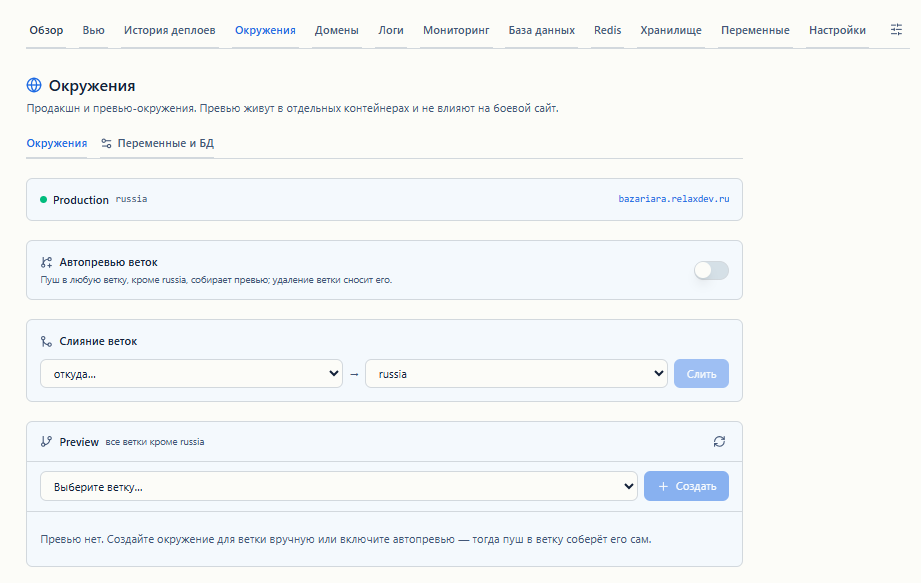
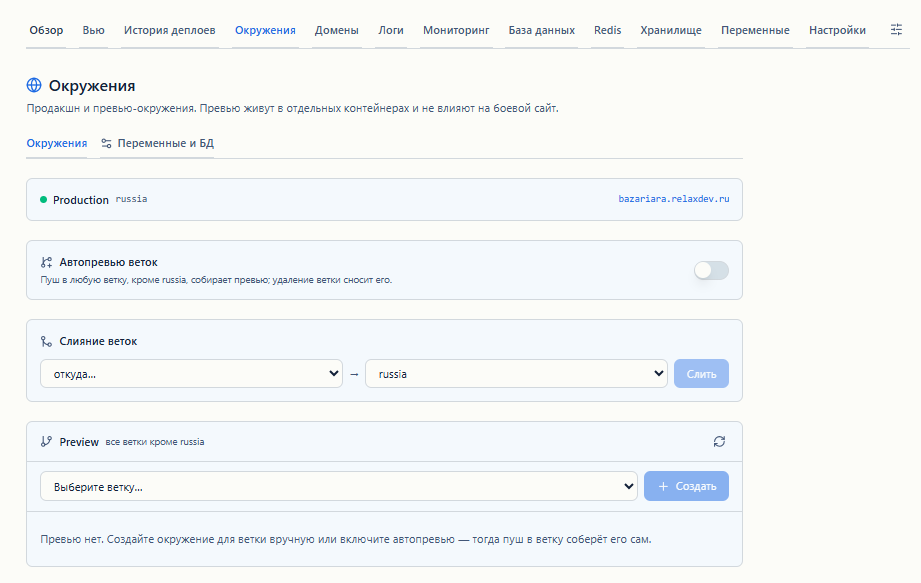 Environments tab: preview of project branches
The second difference: staging must be supported. Someone must ensure that it does not diverge from production in terms of versions, variables and configuration. The preview is assembled by the same builder and from the same settings as the combat deployment, so it has nowhere to go.
Main trap: shared database
This is where the fun begins, and this is the part that is usually mentioned in passing in articles about previews.
The easiest way is to make the preview connect to the combat base. There is no need to create anything, the variables are copied as they are, everything works right away. And this is really enough to check the layout or a new page.
But as soon as the branch contains a migration, it will be executed on production data. Not on a copy, not on a test base. On the very records that clients use. Moreover, it will be executed quietly, at the moment the container starts, and you will not notice it right away.
Therefore, in RelaxDev, the base mode for preview is switched explicitly, and we recommend the “own base, only scheme” mode. It creates a separate database for previews with a production structure, but without a single entry. When the application starts, it downloads migrations and seeds on its own, just as it does on a clean developer’s machine. Combat data is physically unattainable.
There is also a mode with a full copy of the data, but it honestly warns: a copy of a large database takes a long time to create and takes up space. For most problems, the dataless design is better suited.
When a preview is deleted, its database is deleted along with it. There is no need to clean up separately.
Environment variables
The second most common way to shoot yourself in the foot is the combat keys in the preview. The test branch sends real letters to real users, pulls the combat payment gateway, writes to the production storage.
Until the preview has its own set of variables, it inherits the production ones - this is convenient for starting, but temporary. One button creates an independent copy in which you can replace the keys with test ones.
Variables are set either for all previews at once, or for a specific branch - the second overlaps the first. Useful when one branch goes to a separate third-party service, but the rest do not.
A separate detail that saves nerves: if a variable has been added to production that is not in the preview, the panel shows this and offers to add it with one button. Otherwise, the lists diverge imperceptibly, and the preview falls on an empty process.env two weeks after someone added the key.
And if the code reads a variable that is not present either in production or in preview, after assembly, a “Variables without value” banner appears above the project - with the file and the line where it occurs.
Cleaning
Forgotten stands are a separate problem. They are created, viewed once and not deleted, but they continue to occupy memory and disk.
Therefore, the preview lives for 72 hours. The countdown is updated with each rebuild: while the branch is being worked on, the environment will not go anywhere. As soon as work stops, the container, image and database are deleted automatically. You can delete it earlier using the button.
A couple more little things that turned out to be useful
Old version with a separate preview.In the deployment history, each entry has a button that raises this commit as a preview. This is more convenient than a rollback: first look at the old version at a separate address, compare, then decide whether to return. Production has been running all this time.Merge from the panel.Once you have checked the branch, you merge it into production without going to the Git provider interface. Before merging, you can see how many commits are ahead and how many files are affected. Then the usual autodeploy is triggered.Closed from search.All preview addresses are given with noindex. Duplicates of your site will not appear in the search results - otherwise the search engine will sooner or later find the stand and start showing it instead of the main domain.Available to editors. Any team member with the editor role can create a preview, not just the project owner. Actually, this is what everything was started for: the developer raises his own thread and shares the link, without pulling anyone.
What previews can't do
Telegram bots are not given previews, and this is deliberate: two instances of a bot with one token begin to fight to receive updates, and the working bot breaks. For bots, you need a separate token for each environment - for now this is done manually.
Merging branches from the panel works for GitHub. The previews themselves are created from GitHub, GitLab, GitVerse and GitFlic in the same way, but for merging the other providers still use their own interface.
How to try
Open the Environments tab in any project deployed from Git, select a branch, and click Create. In one to three minutes the address will be ready.
Previews are available on all plans, including free.
Details - in documentation, questions and suggestions - on forum.
Read also
This is a translation of the original Russian article. Comments are on the Russian page.