How to connect your domain to a project on RelaxDev, what records are needed, how a subdomain differs from a domain, how certificates and redirects work - and what to do with Cyrillic domains.
How to connect your domain to a project on RelaxDev, what records are needed, how a subdomain differs from a domain, how certificates and redirects work - and what to do with Cyrillic domains.
Briefly: what records are needed
For the domain example.ru, the registrar or Cloudflare only needs two records:
| Type | Name | Meaning |
|---|---|---|
| A | @ | 72.56.37.162 |
| A | www | 72.56.37.162 |
Instead of the second A-record, you can put CNAME www → example.ru. In the project, add both names - example.ru and www.example.ru - and choose which one is the main one (more on this below).
What should not happen:
- Second A-record to someone else's address.After moving from Vercel, there is often
76.76.21.21or216.198.79.1left. Then some visitors end up on the old site, and the certificate may not be issued.
-Alien NS.NS records - only native ones, from the registrar or from Cloudflare, without additional ones.
-AAAA records to someone else's address.Let's Encrypt also checks the domain over IPv6: if the AAAA does not lead to us, the certificate will not be issued.
-Prohibiting CAA record.If the domain has a CAA, letsencrypt.org must be allowed in it.
Do not touch mail records (MX, SPF, DKIM): they have nothing to do with the site, and after changing the A-record, mail will continue to work as before.
Connection order
- 1.Register records with the registrar or Cloudflare.
- 2.Check them on dnschecker.org: Type A, your domain. In all regions there should be only
72.56.37.162. - 3.Only after this add the domain to the project. The panel itself will check the DNS through public resolvers and, if the records are not yet on us, it will warn and will not add the domain without confirmation.
- 4.The certificate will be issued automatically, usually within a minute.
Don't leave a domain with incorrect records
A domain added to a project immediately receives a certificate order. If the records do not point to us, each attempt fails, and Let's Encrypt, after five failures per hour for one name, temporarily stops issuing certificates for it. The longer a domain hangs with incorrect records, the longer the wait will be.
Therefore: the records are not ready - remove the domain from the project, correct the DNS, check on dnschecker.org and add again. If you have done everything, and after an hour the site does not open via HTTPS, write to support - we will look at the certificate issue log.
Moving with Vercel
1.Remove a domain in Vercel:project → Settings → Domains → Remove. Otherwise, Vercel continues to consider the domain its own.
2.Check NS.If the domain was delegated to Vercel (ns1.vercel-dns.com), return the NS to the registrar or transfer to Cloudflare.
3.Delete old entries76.76.21.21, 216.198.79.1 and cname.vercel-dns.com - both at the registrar and in Cloudflare, if the zone is there.
4.Fill in our records and check on dnschecker.org - continue as in the “Connection procedure”.
The certificate is issued itself
HTTPS is enabled automatically: as soon as the domain points to our server, Traefik receives a Let's Encrypt certificate - usually within a minute. There is no need to download anything.
If a certificate is not issued, the reason is almost always DNS: the A record has not yet been updated, it points to the wrong place, or an old record remains nearby. Check that public resolvers respond:
dig +short A example.ru @8.8.8.8

dig +short A www.example.ru @1.1.1.1

dig +short NS example.ru
The answer to A must only contain 72.56.37.162.
Cloudflare: "DNS only"
If the domain is served by Cloudflare, switch the records to DNS onlymode - gray cloud. In proxy mode (orange cloud), traffic goes through Cloudflare, and its SSL settings can easily loop redirects or interfere with certificate issuance. We only need Cloudflare as a DNS: it answers what the domain address is, and the site opens directly from our server.
Transferring NS to Cloudflare is a good solution if not everything is visible in the registrar panel. This happened with the bazariara.ge store: the registrar gave a hidden record to Vercel, which was not in its interface, and some visitors ended up on the old site. After transferring NS to Cloudflare, exactly what we specified remained in the zone.
How long to wait after changing records
New entries are usually visible within 5–15 minutes. Changed - longer: resolvers remember the old value for as long as indicated in the TTL. Reg.ru has a minimum TTL of one hour.
You can speed it up with the two largest public DNS - they have a cache reset button:
- Google: developers.google.com/speed/public-dns/cache - specify the domain and type A;
- Cloudflare: one.one.one.one/purge-cache - the same.
If the registrar’s NS servers already have the correct address, but someone’s site still opens in the old way, it’s just a cache, it will go away on its own.
Domain or subdomain
Technically, shop.example.ru is the same address as example.ru, just with a separate entry. In practice there is a difference:
-Subdomain is a separate websitefor search engines and browsers: its own positions in search results, its own cookies, its own certificate. A subdomain is suitable for a separate product or section that lives its own life.
-Section - example.ru/shop- inherits the weight of the main domain. If the goal is to promote one site, a section is usually more profitable than a subdomain.
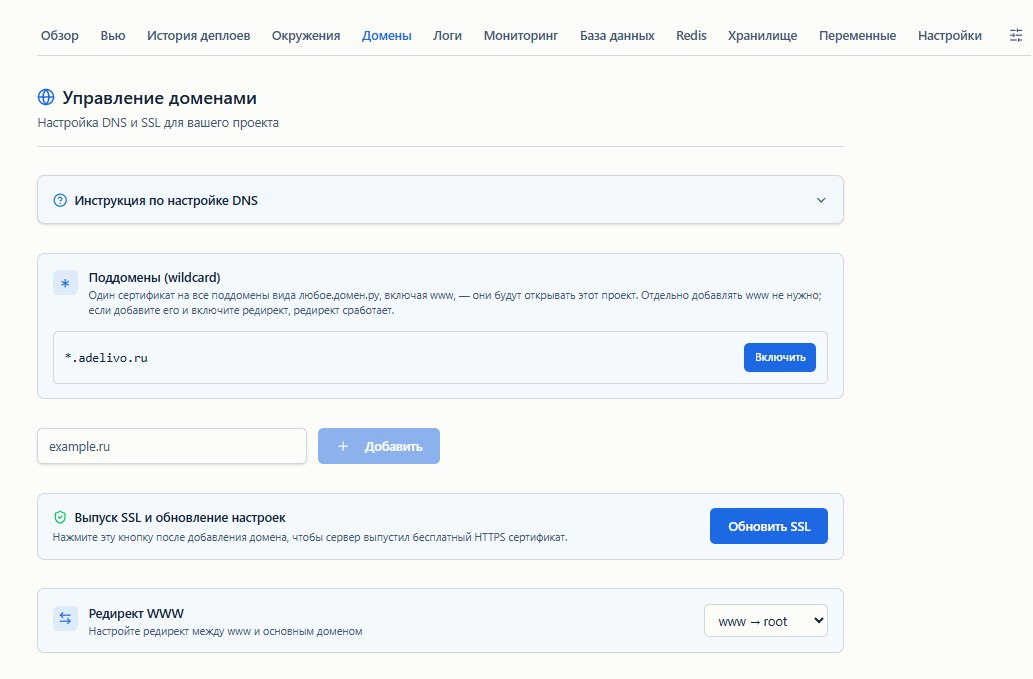
Each subdomain is added to the project separately, with its own A-record. If there are many subdomains or they are created on the fly - for example, each client has their own client.example.ru - you can enablewildcard(PRO Team tariff) in the project: all subdomains *.example.ru at once and one certificate for them. It requires three records: CNAME _acme-challenge to issue the certificate, A for *.example.ru, and A for the domain itself. The panel will show the exact values when turned on and will check the DNS itself.
The technical address of the project project.relaxdev.ru and preview addresses are closed from indexing: they do not create duplicates of your site in the search results.
www or without www: choose one
For search engines, example.ru and www.example.ru are two different addresses. If both open the site, duplicates appear. Therefore, in the domain settings, select the main option:
-from www to without wwwis the most common choice; -without www to www;
- both open the site - only if you know exactly why.
The second address will give a permanent 301 redirect to the main one. Use the main option everywhere: in canonical, sitemap, links, Metrica and Search Console.
Redirect a domain to another
If you moved to a new name or bought a domain with a typo, the project includes"Domain Redirection": permanent redirection of the entire domain to another address. Search engines transfer positions to a new address.
-"Save Path"- old.ru/page?x=1 will open new.ru/page?x=1. Without this checkbox, all pages lead to the same address.
-The certificate for the old domainis issued automatically, so https://old.ru works too.
-www of the old domainis included in the redirect only if it has an A-record to our server: otherwise the certificate issue would fail for both names.
-You can remove the redirect at any time- the domain will open the project again, without rebuilding.
Visitors with foreign VPNs
Some foreign VPNs cut traffic to Russian addresses. For such visitors, you can enableforeign loginfor the domain: traffic goes through a server abroad, the certificate and route remain the same. It is turned on in the domain settings, after which the A-record changes - the panel will show which address.
Cyrillic domains (.рф and others)
Domains like кухниостровский.рф are stored in the DNS as punycode: xn--b1albebcsjatkdjj4a.xn--p1ai. It's the same domain, just in a form that all programs understand.
-In the panelenter the domain as convenient - in Cyrillic or in punycode. It is stored in punycode and displayed in Cyrillic.
-Records at the registrarare the same: A on 72.56.37.162.
-In canonical, sitemap and linksuse the same address form. A link copied from a browser or search results will come to punycode - this is normal, it will open the same site.
-Google may show xn--… instead of the name in the results.This is decided by the name of the site - WebSite markup on the main page, detailed in SEO guide.
-Yandex Webmaster has a “Site Name Register”: you can set it to look like КухниОстровский.рф.
Checklist
- A-records
@andwwwpoint only to72.56.37.162, no old addresses - Both names are added to the project, the main option is selected - with or without www
- Cloudflare records in DNS only mode
dig +short A домен @8.8.8.8responds with the correct address, on dnschecker.org - in all regions- The domain has been removed from Vercel and other platforms where it was previously
- The site opens over HTTPS without warnings
- Old domains have been redirected if they were
Read also
- A year at Vercel and one moving evening: bazariara.ge - moving a store with a hidden entry at the registrar
- Setting up SEO for a site on Next.js
- Environment preview: how to check a branch without breaking production
- Documentation: domains
Questions - on the forum or in the comments below.
This is a translation of the original Russian article. Comments are on the Russian page.